![[How to] Add Denominations on Runtime in Butter POS](/_next/image?url=https%3A%2F%2Fwebsiteapi.butterpos.com%2Fstorage%2Fimg%2Fadd-new-denominations-final.jpg&w=1080&q=75)
Cash handling in a live outlet environment is never static. Notes and coins change hands constantly, and the exact cash breakup available at the counter can vary every day and every shift.
Butter POS addresses this reality through the “Add Denominations on Runtime” feature. This feature allows users to enter or adjust cash denominations at specific operational stages, instead of locking them in advance.
It’s important to understand one thing clearly:
In Butter POS, denominations are not added during normal billing. They are handled only at defined cash control points, which keeps reporting and reconciliation accurate.
This guide explains:
- What runtime denominations mean in Butter POS
- Where exactly they can be added
- Why they matter
- And how to use them correctly at each stage
What Does “Add Denominations on Runtime” Mean in Butter POS?
In Butter POS, denominations represent the physical cash breakup, notes and coins, that make up a cash amount.
“Add Denominations on Runtime” means: You can define or update the denomination breakup at the moment cash is being officially recorded without needing pre-configuration.
However, this flexibility is intentionally limited to specific stages to maintain control and accuracy.
Butter POS supports runtime denominations at three points:
- Day Open
- Float Addition
- Shift/Day Close
Why Runtime Denominations are Important
In real outlet operations:
- Opening cash may differ from day to day
- Float amounts can change based on operational needs
- Closing cash breakup may not match assumptions made earlier
If denominations were fixed:
- Cash mismatches would increase
- Manual adjustments would become common
- Reconciliation would be harder
By allowing denominations at runtime only where cash is officially counted, Butter POS ensures:
- Flexibility where needed
- Control where required
- Accurate tracking across the day
The Three Places Where Denominations Can Be Added
-
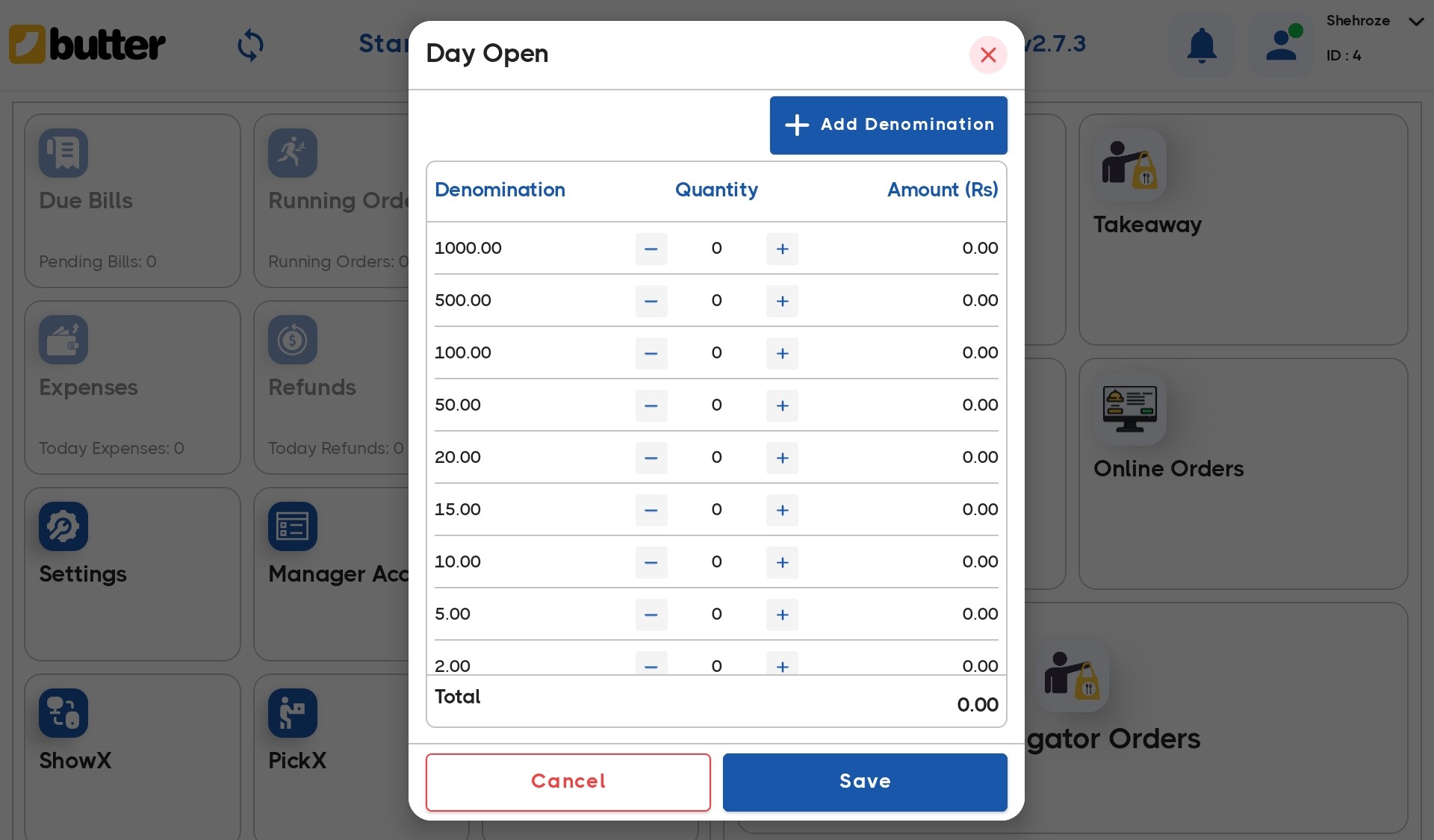
Day Open – Opening Cash Denominations
When starting the business day, cash counters usually have a certain amount of opening cash.
In Butter POS:
- During Day Open, the user enters the opening cash amount
- Along with the denomination-wise breakup
Here, runtime denominations allow you to:
- Enter the actual notes and coins available
- Add a denomination if it wasn’t used previously
- Ensure the opening cash total matches physical cash
This opening denomination breakup becomes the baseline for the day’s cash flow.
-
Adding Float – Runtime Denominations During the Day
Float refers to additional cash added to the counter during the day, usually to:
- Manage change
- Handle higher cash volume
- Support peak hours
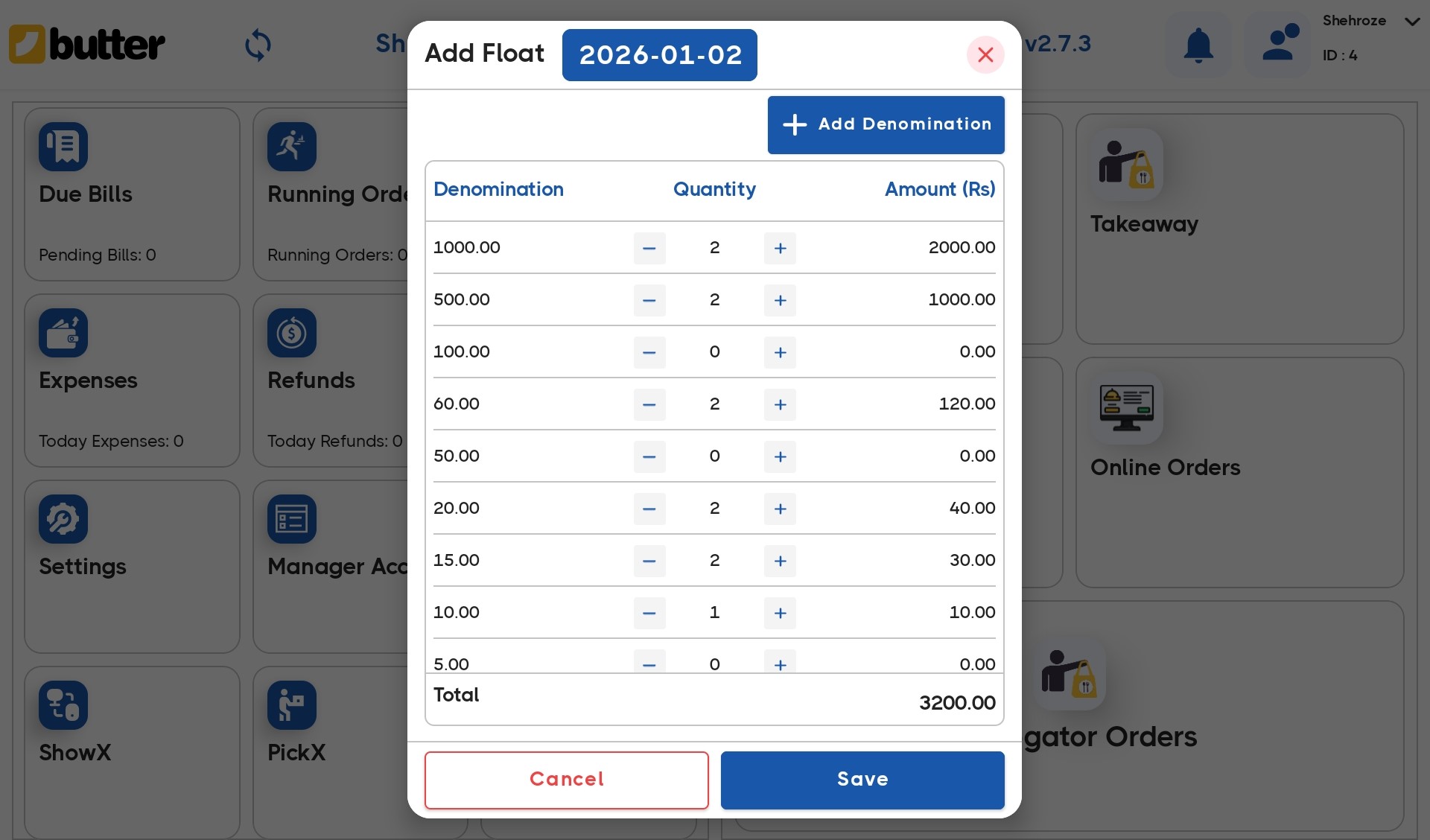
At this stage, runtime denominations allow:
- Adding new denomination values if required
- Entering the exact breakup of the float cash
- Maintaining clarity on where extra cash came from
-
Shift Close / Day Close – Closing Cash Denominations
At the end of a shift or business day, physical cash is counted and matched against system totals.
During Shift Close or Day Close in Butter POS:
- Users enter the final cash count
- Along with denomination-wise details

Runtime denominations here allow:
- Entering the real breakup of notes and coins present
- Adding denominations that appeared during the day
- Accurately reflecting shortages or excess in cash
This step is critical because:
- Closing denominations are used for reconciliation
- They determine cash variance
- They directly impact settlement accuracy
Step-by-Step Guide to Add Denominations on Runtime
This is the core workflow most users interact with.
-
Open the Cash Denomination Screen
Navigate to the screen where cash is being counted, this could be during:
- Day open
- Float Addition
- Day/shift close
You’ll see a list of existing denominations with quantity fields.
-
Review Existing Denominations
Butter POS displays:
- Denomination values (for example: 10, 50, 100, etc.)
- Quantity entered for each
- Automatically calculated totals
This gives you a clear picture of the current cash breakup.
-
Add a New Denomination at Runtime
If a required denomination is missing:
- Select the option to add a denomination
- Enter the denomination value
- Enter the quantity available
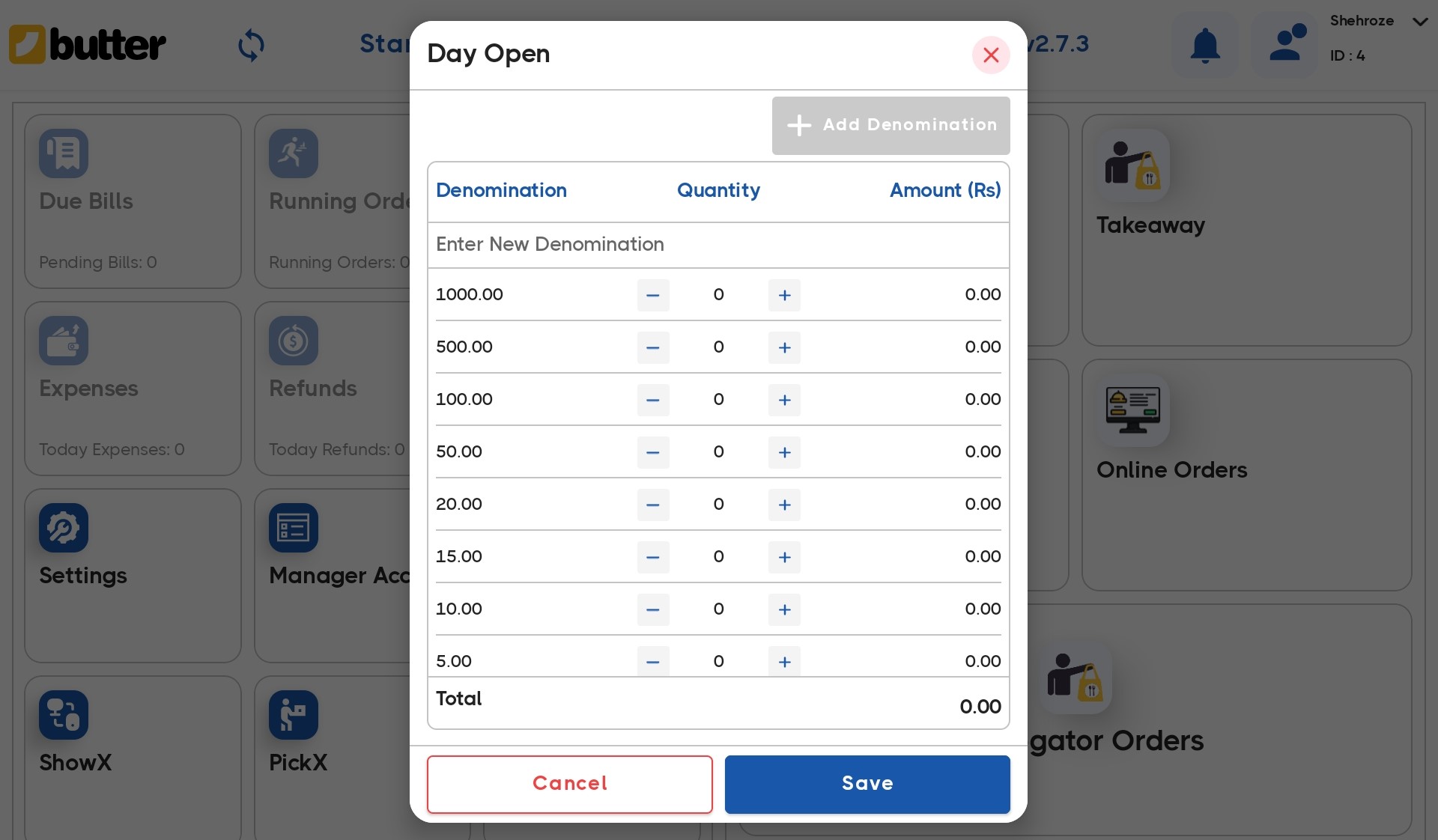
Butter POS immediately includes it in the cash calculation.
-
Update Quantities for Existing Denominations
If the denomination exists but the count has changed:
- Simply update the quantity field
- The total cash amount recalculates automatically

No manual calculation is required.
-
Save and Confirm
After verification:
- Save the denomination details
- Proceed with day opening or closing
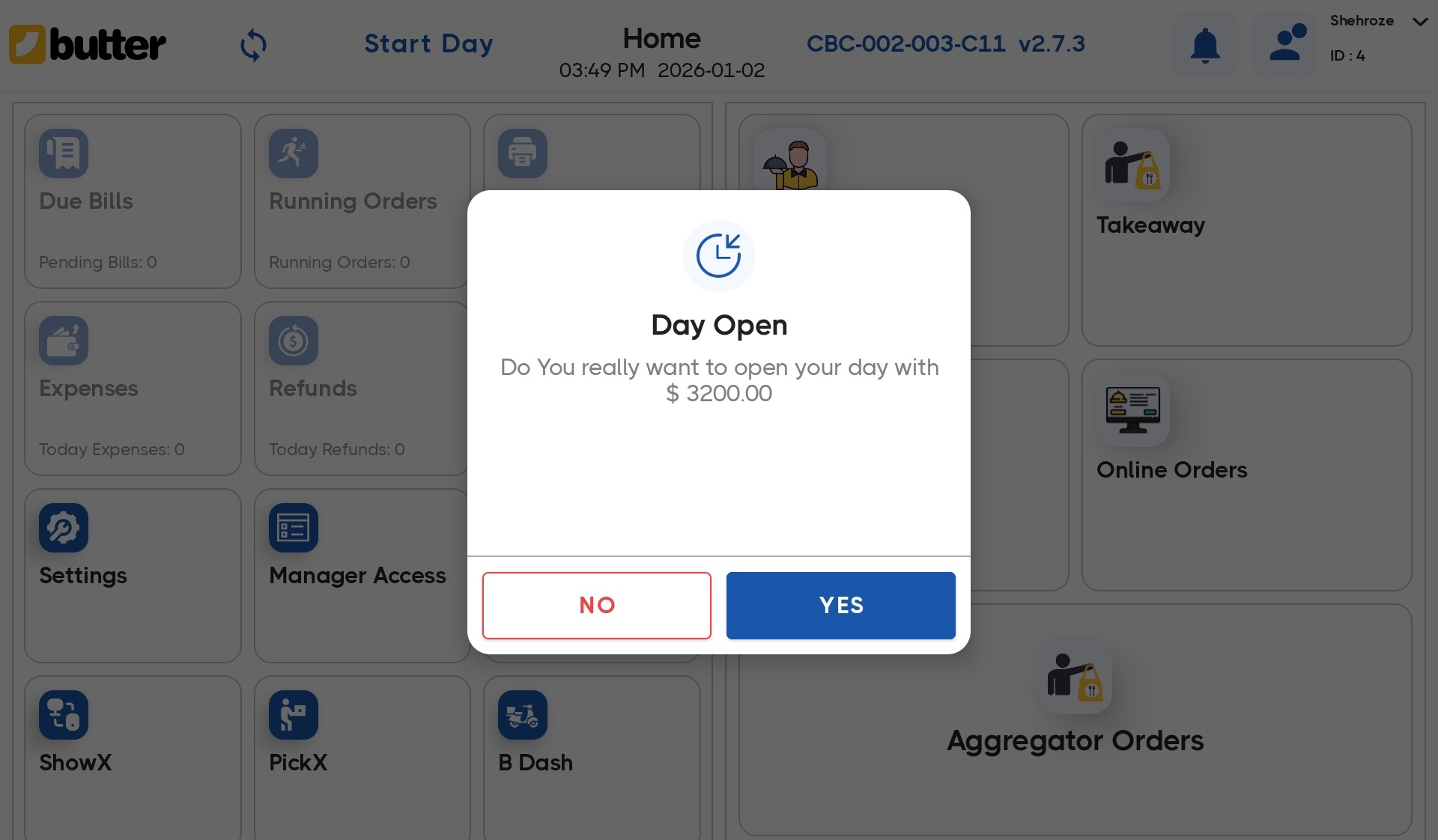
The updated breakup is now used for that transaction or settlement flow.
Summary
The Add Denominations on Runtime feature in Butter POS is not about unlimited flexibility, it’s about controlled flexibility.
By allowing denominations only at:
- Day Open
- Float Addition
- Shift Close / Day Close
Butter POS aligns system cash with real physical cash, while keeping reporting accurate and reconciliation reliable.
Once users understand these three touchpoints, cash handling becomes structured, predictable, and far easier to manage.
Frequently Asked Questions - FAQs
Can denominations be added during normal billing?
No. Butter POS does not support denomination entry during billing.
Can I change denominations after Day Open is completed?
Changes follow the standard supported flow during settlement or closing stages.
Does float denomination affect sales reports?
No. Float is tracked separately from sales cash.

![[How to] Add Denominations on Runtime in Butter POS](/_next/image?url=https%3A%2F%2Fwebsiteapi.butterpos.com%2Fstorage%2Fimg%2Fadd-new-denominations-final.jpg&w=640&q=75)


![[How to] Manage Multiple Order Types in Butter POS](/_next/image?url=https%3A%2F%2Fwebsiteapi.butterpos.com%2Fstorage%2Fimg%2Fhow-to-manage-multiple-order-types-in-butter-pos.png&w=640&q=75)


 Region: United States


