
Running a successful outlet today is not just about taking orders, it's about understanding your business numbers clearly. From daily sales and payment methods to item performance and staff activity, every detail matters when you want to grow profitably.
That's where Reports & Analytics in Butter POS plays a crucial role. It gives business owners and managers a clear, structured view of what's happening inside their outlet, without relying on guesswork. With well-organized reports, you can track sales, monitor adjustments, review staff performance, and make confident decisions based on real data.
In this guide, we'll walk you through how Reports & Analytics works in Butter POS, how to use it effectively, and how it helps you take better control of your daily operations.
What Are Reports & Analytics in Butter POS
In Butter POS, Reports & Analytics is the section where all your operational data is organized into clear, structured reports.
It helps you answer questions like:
- How much did I sell today?
- Which items are performing best?
- How were payments collected?
- Were any bills voided or discounted?
- How is my staff performing?
Instead of guessing, Butter POS gives you accurate, auditable data that reflects what actually happened at your outlet.
Why Reports & Analytics Matters for Your Business
Reports & Analytics in Butter POS is built for control, visibility, and accountability.
Key Benefits
- Better financial clarity – Know your sales, taxes, and discounts.
- Operational control – Track voids, edits, and adjustments.
- Menu optimization – Identify top-selling and low-performing items.
- Staff accountability – Review order activity by user.
- Faster decision-making – Daily summaries and bill-level details in one place.
Once you understand where to look, it becomes a powerful management tool.
Types of Reports Available in Butter POS
Butter POS organizes reports so you can view data from different angles.
1. Sales Reports
These reports show:
- Gross sales
- Net sales
- Taxes
- Discounts
- Final bill totals
They're typically used for daily closing, accounting, and performance tracking.
2. Bill-Level Reports
These reports display individual bills with:
- Bill number
- Date and time
- Bill amount
- Payment method
- Adjustments (if any)
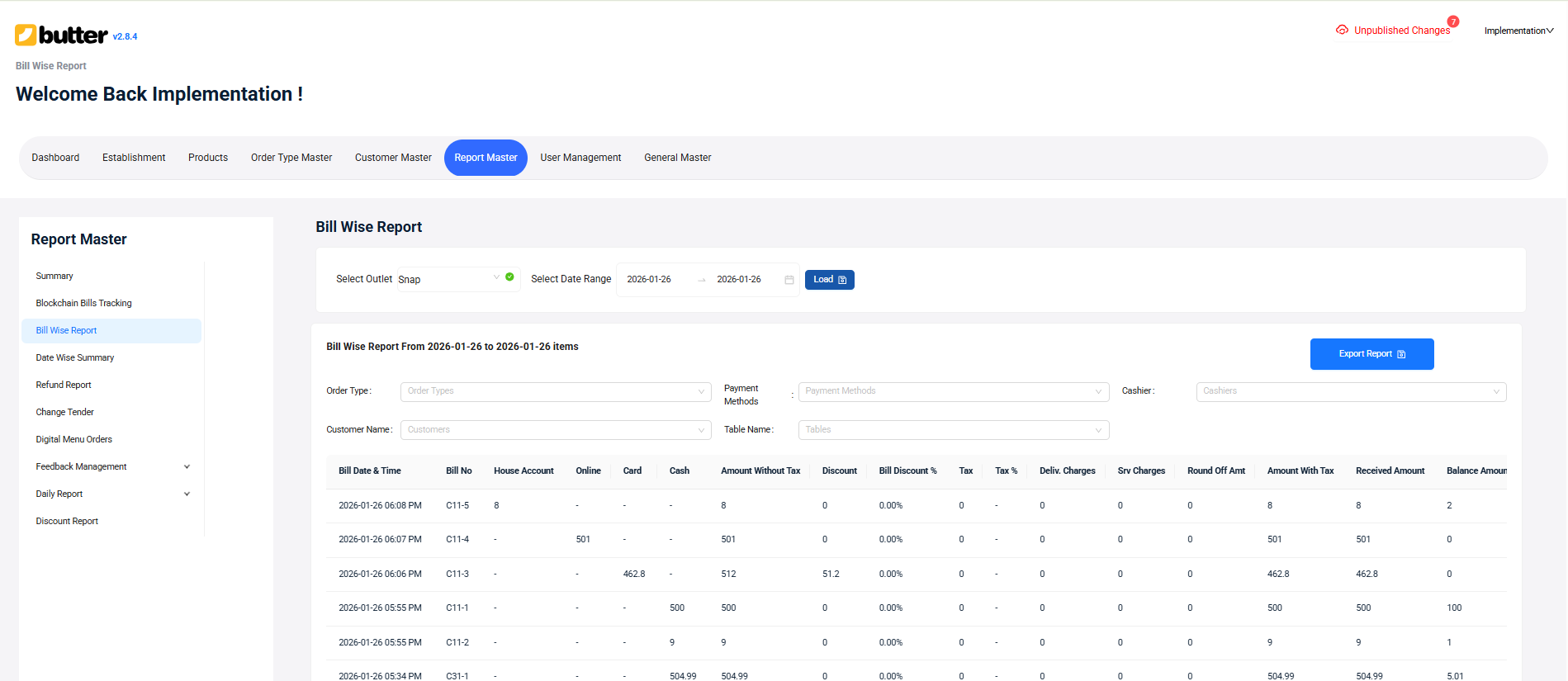
They're useful when you need to verify or audit a specific transaction.
3. Item & Category Reports
These reports help you understand:
- Which items sell the most
- Category-wise sales performance
- Quantity sold per item
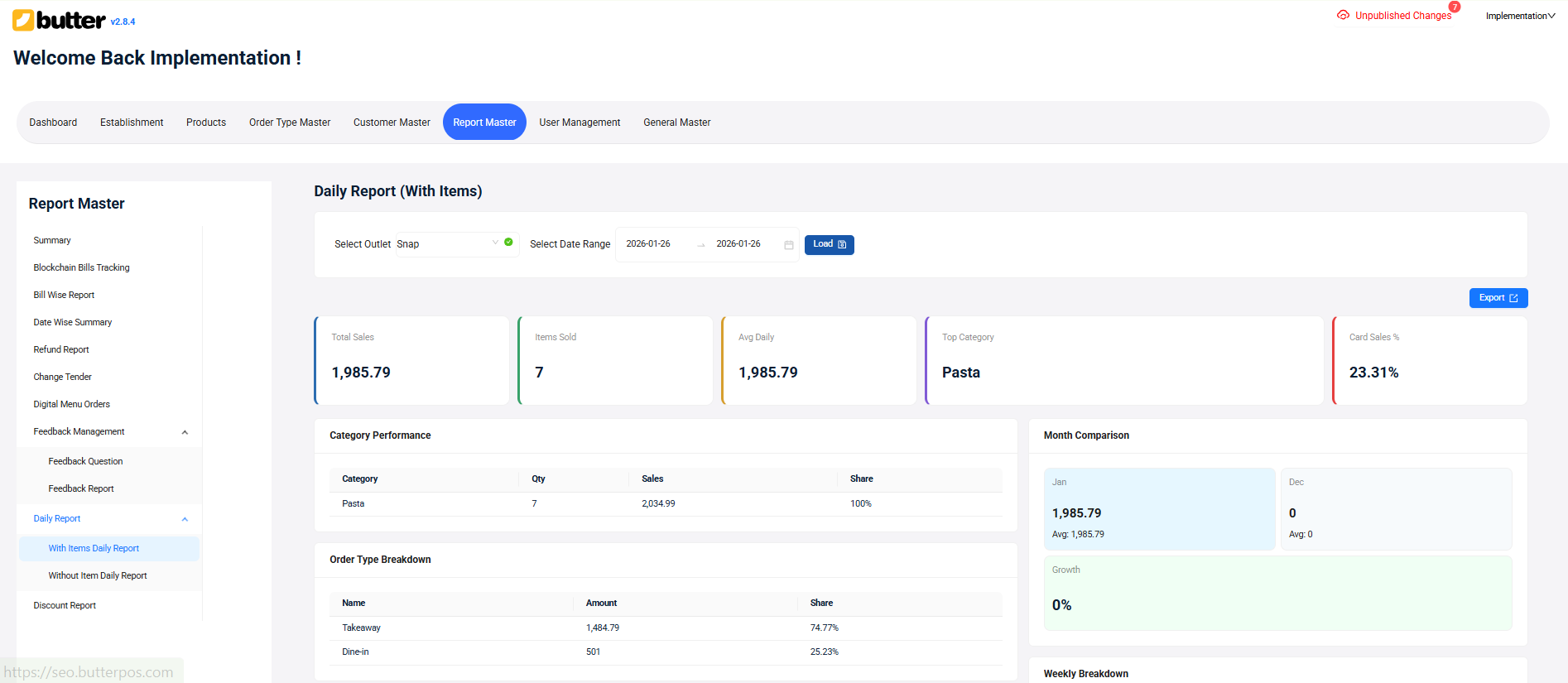
This data is especially useful for menu planning and inventory decisions.
4. Payment (Tender) Reports
Tender reports show how customers paid:
- Cash
- Card
- Other payment modes
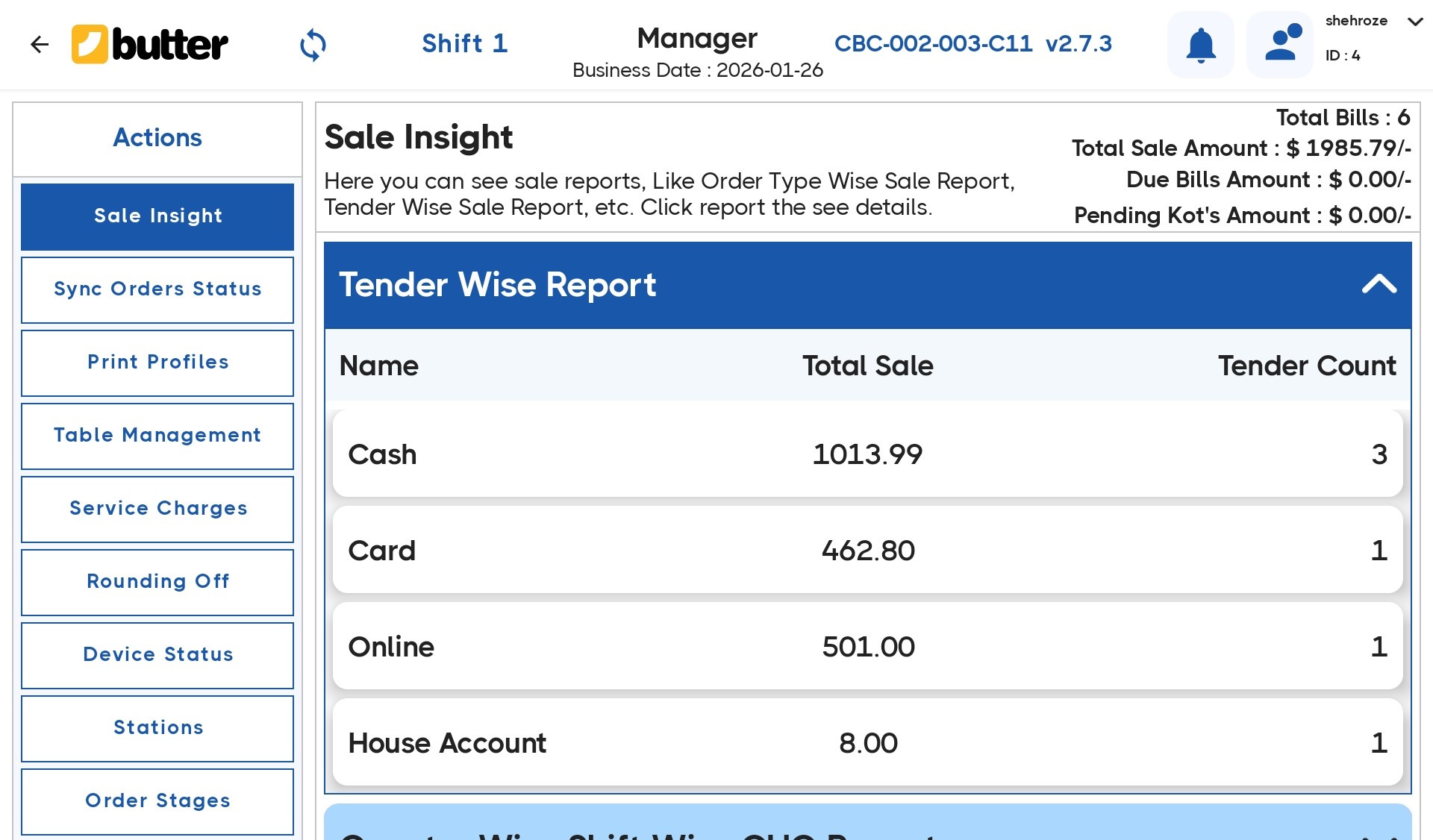
They're essential for cash drawer reconciliation and end-of-day checks.
5. Adjustment & Discount Reports
These reports capture:
- Voided bills
- Modified bills
- Applied discounts
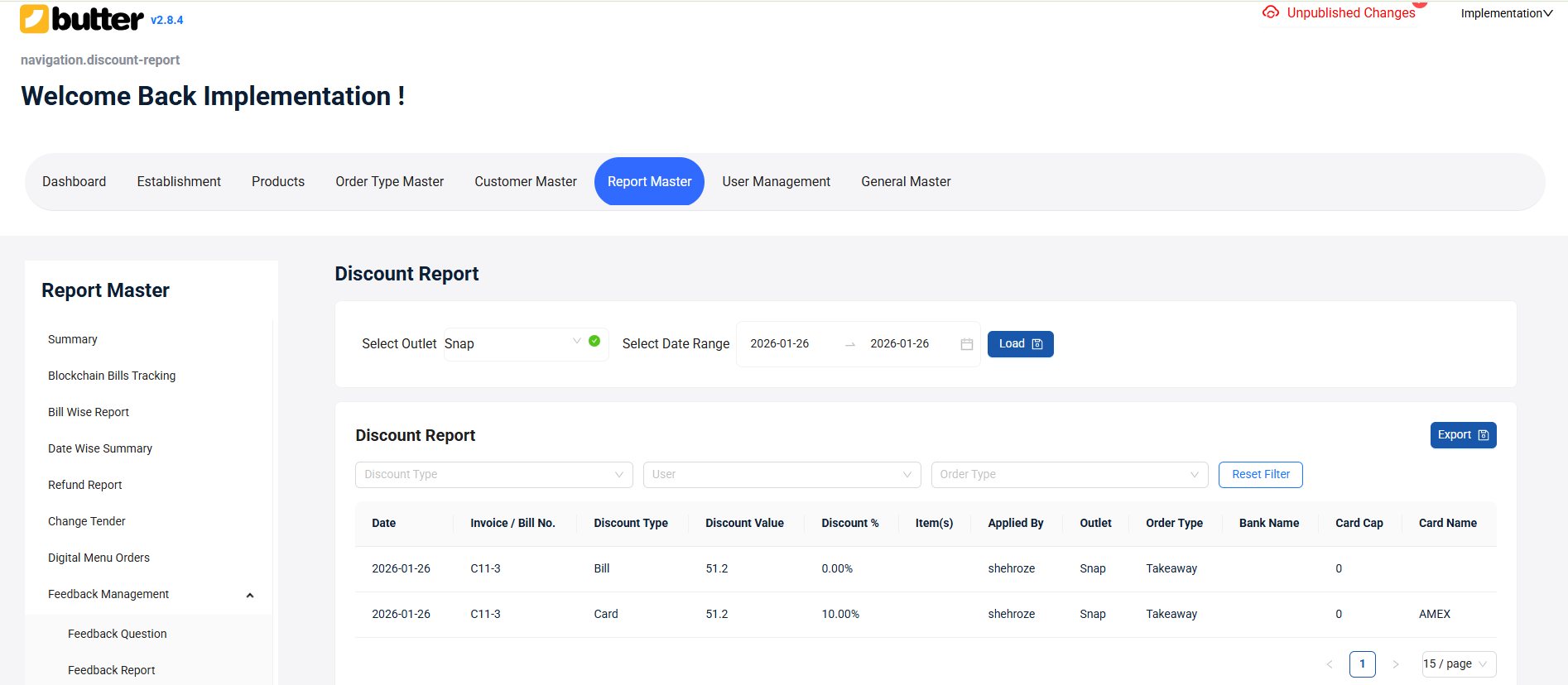
They're commonly used by managers to monitor misuse and maintain discipline.
6. Staff Performance Reports
These reports track order activity by:
- Order taker
- Cashier or user
They help you measure productivity and accountability across shifts.
How Reports & Analytics Works in Butter POS
In Butter POS, you generally:
- Open the Reports section
- Select a report type
- Choose a date or date range
- Apply filters if needed
- Review the generated data
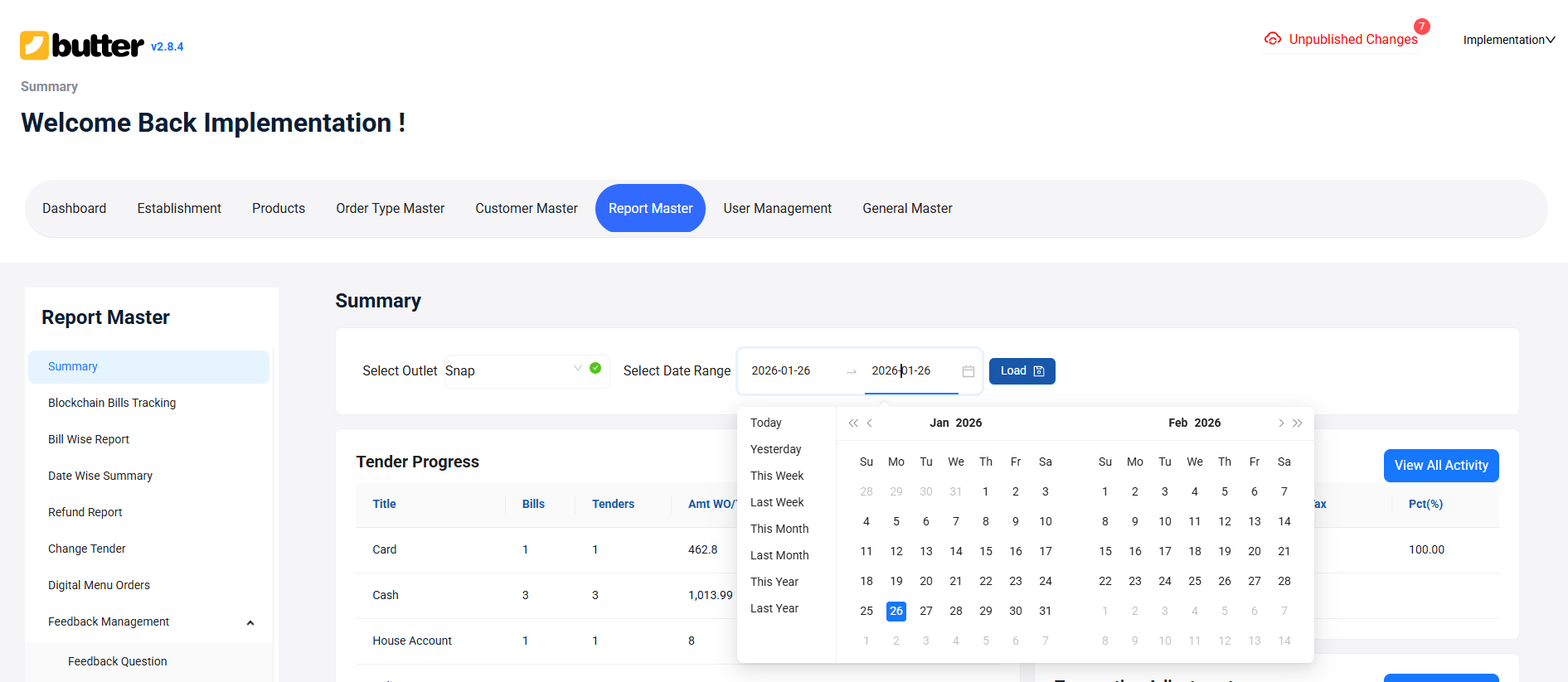
The structure stays consistent so once you learn a few reports, the rest feel familiar.
Practical Example: Using Reports & Analytics in a Real Scenario
Scenario
You run a café and want to understand why cash doesn't match expected sales at the end of the day.
Step-by-Step Use of Reports
-
Check the Sales Summary Report: This shows total net sales for the day.
-
Open the Tender Report: You review how much was collected via cash, card, and UPI.
-
Review the Adjustment Report: You notice a few bills were voided and some discounts were applied.
-
Cross-check Bill-Level Details: You open bill-wise reports to verify specific transactions.
Result
You identify:
- Legitimate voids with reasons
- Approved discounts
- No missing bills
Instead of guessing, you now have clear, documented answers.
That's the power of Reports & Analytics in Butter POS.
Best Practices for Using Reports & Analytics Effectively
- Review sales and tender reports daily
- Audit adjustments and discounts regularly
- Use item reports to refine your menu
- Don't rely on memory, rely on reports
- Train managers to read reports confidently
Once reports become part of your routine, operations feel more controlled.
Conclusion
Reports & Analytics in Butter POS is more than just a reporting section, it's a decision-making tool for modern businesses. When used correctly, it helps you move from assumptions to clarity, from manual checks to system-backed insights.
By regularly reviewing sales, payments, item performance, and adjustments, you gain full visibility into your outlet's performance. Over time, this not only improves accuracy and accountability but also makes daily operations smoother and more predictable.
Once you're familiar with the reporting flow, Butter POS empowers you to manage your business with confidence, knowing that every decision is supported by reliable data.
Frequently Asked Questions (FAQs)
What are Reports & Analytics used for in Butter POS?
In Butter POS, Reports & Analytics is used to review and understand your business performance through structured data. It helps you analyze sales, payments, item performance, staff activity, and adjustments in one place. Instead of relying on assumptions, you get system-recorded information. This makes daily monitoring, auditing, and planning more accurate. Managers use it to maintain control and transparency. Overall, it supports smarter, data-driven decisions.
Can I see daily sales in Butter POS?
Yes, Butter POS allows you to view daily sales through its sales reports. You can select a specific date or a date range to see total sales figures. These reports include key values like gross sales, net sales, taxes, and discounts. This helps you understand how your outlet performed on any given day. Daily sales reports are commonly used for end-of-day reviews. They provide clarity and consistency in tracking revenue.
Does Butter POS show bill-wise transaction details?
Yes, Butter POS provides bill-wise reports that show individual transaction details. These reports include bill numbers, date and time, bill amounts, and payment methods. They are useful when you need to verify a specific bill or resolve customer queries. Managers often use them for audits and internal checks. Bill-wise visibility improves accountability. It also helps trace errors quickly if something looks incorrect.
Can I track cash vs card payments?
Yes, Butter POS allows you to track payments by mode using tender reports. These reports clearly show how much was collected through cash, card, UPI, or other payment methods. This is especially useful during daily cash drawer reconciliation. It helps ensure that physical cash matches system records. Payment tracking also reduces discrepancies. Overall, it strengthens financial control at the outlet.
Are voided bills recorded in reports?
Yes, all voided and modified bills are recorded in Butter POS reports. These entries appear in adjustment-related reports for proper tracking. This ensures that no transaction is removed without a record. Managers can review when and why a bill was voided. It improves transparency and reduces misuse. Such reporting is essential for audits and internal reviews.
Can I track discounts applied by staff?
Yes, Butter POS records discounts through dedicated discount reports. These reports show where discounts were applied and their impact on sales. Managers can review discount activity to ensure it follows outlet policies. This helps prevent unauthorized or excessive discounting. Over time, it improves pricing discipline. It also provides clarity on how discounts affect revenue.
Does Butter POS provide item sales reports?
Yes, Butter POS provides item-level sales reports for detailed analysis. These reports show how many times each item was sold. They help you understand which products perform well. Item reports are useful for menu planning and promotions. Managers use them to identify trends. This data supports smarter business decisions.
Can I identify my top-selling items?
Yes, Butter POS makes it easy to identify top-selling items through item performance reports. These reports highlight items with the highest sales volume or value. This helps you understand customer preferences. You can use this insight to optimize your menu. It's also helpful for promotions and combos. Knowing top sellers supports revenue growth.
Are staff activities visible in reports?
Yes, Butter POS includes reports that show staff-related order activity. These reports help track which user handled transactions. Managers can review performance across staff members. This improves accountability and shift-level monitoring. It's especially useful in multi-staff environments. Staff visibility helps maintain operational discipline.
Can reports help with inventory planning?
Yes, reports in Butter POS support inventory planning indirectly. Item sales trends show which products sell frequently. This helps estimate demand and avoid stock shortages. Managers can plan purchasing more accurately. Over time, this reduces wastage and overstocking. Reports bring data-backed clarity to inventory decisions.
Is Reports & Analytics available for date ranges?
Yes, most reports in Butter POS support custom date and time ranges. You can analyze data for a single day, week, or longer period. This flexibility helps compare performance over time. Managers often use date ranges for trend analysis. It also helps during audits and reviews. Date-based filtering makes reports more meaningful.
Can I audit suspicious transactions using reports?
Yes, Butter POS reports are designed to support audits. Bill-wise and adjustment reports help identify unusual activity. Managers can review voids, edits, and discounts in detail. This makes it easier to investigate discrepancies. Auditing through reports reduces dependency on manual checks. It strengthens internal control processes.
Does Butter POS automatically generate reports?
In Butter POS, reports are generated when you select the report type and filters. The system pulls finalized transaction data automatically. You don't need to manually compile figures. This reduces errors and saves time. Reports follow a consistent structure. This makes them easy to review and understand.
Are reports accurate in real time?
Reports in Butter POS reflect finalized transactions recorded in the system. Once a bill is completed, it appears in reports accordingly. This ensures accuracy and consistency. Real-time visibility helps managers stay updated. It also supports quick decision-making. Reports are aligned with system-recorded data.
Can managers use reports for daily closing?
Yes, reports in Butter POS are commonly used for daily closing. Sales, tender, and adjustment reports help reconcile the day's activity. Managers can verify totals before closing shifts. This reduces cash mismatches and confusion. Daily closing becomes more structured. Reports bring confidence to the closing process.
Do reports include tax details?
Yes, Butter POS sales reports include tax-related information. This helps you see how much tax was collected. Tax visibility is important for accounting and compliance. Managers can review tax figures alongside sales. It ensures accuracy in financial reporting. This reduces errors during audits or filings.
Can I export reports from Butter POS?
Export availability depends on your system setup, but reports are structured for easy sharing. The data layout is clear and organized. This makes reports useful for accountants or management reviews. Even without exports, reports are easy to interpret. They support internal and external analysis. Structured reporting saves time.
Are reports useful for multi-shift operations?
Yes, reports are very useful in multi-shift environments. Managers can compare performance across different shifts and users. This helps identify operational gaps. It also supports fair staff evaluation. Shift-wise clarity improves accountability. Reports make multi-shift management smoother.
Do reports replace manual bookkeeping?
Reports in Butter POS significantly reduce manual bookkeeping work. Since data is system-recorded, fewer manual entries are needed. This lowers the chance of human error. Managers can rely on reports for most reviews. While accounting processes may still exist, reports simplify daily tracking. They improve efficiency and accuracy.
Is Reports & Analytics difficult to use?
Reports & Analytics can feel detailed initially, especially for new users. However, once you understand the flow, it becomes very practical. The structure remains consistent across reports. With regular use, it saves time instead of adding complexity. Managers gain confidence quickly. Over time, it becomes an essential daily tool.





 Region: United States


